Uploading & Processing Media
Upload photos and video to an order — accepted file types and size limits, floor plans vs photos, and how Spatiko optimizes every file for delivery.
Last updated
Media in Spatiko always attaches to an order — the record that ties a shoot to its client and property. Once your files are on the order, Spatiko processes them and readies them for a branded delivery gallery.
Getting media onto an order
There are two ways to get files onto an order:
- Direct upload — open the order’s upload dialog and drag and drop your files, or select them from your device.
- Cloud sync — drop files into the order’s cloud folder and Spatiko imports them for you. See cloud storage sync to connect Dropbox or Google Drive.
Once you hit Upload, the batch hands off to a background upload center: the dialog closes, a small widget in the corner tracks progress, and you keep working — even on a different order — while the files go up. If any file fails, the widget shows how many and lets you retry just the failures.
Uploading from a phone or iPad is reliable too, even with big files — handy for getting a shoot moving from the driveway before you’re back at your desk.
On a cloud-backed order the dialog also carries a Save originals checkbox, on by default: leave it on and your originals land in the order’s cloud folder (which is what makes original-resolution delivery possible), while optimized copies import into the order. Untick it and only the optimized copies are stored — you won’t be able to deliver original files for that order.
Accepted types and size limits
Photos and video are handled separately.
- Photos — JPEG or PNG, up to 100 MB each.
- Video — MP4, MOV, WebM, MKV, AVI, M4V, MPG/MPEG, MTS/M2TS, or 3GP, up to 5 GB each.
Photo uploads take JPEG and PNG only, so export your finished edits before you upload — RAW and HEIC files aren’t accepted as photos. A file in the wrong format or over the limit is rejected by name, so you know exactly which one to fix in a big batch.
Each order holds up to 200 photos and floor plans, on every plan. AI Studio edits you keep and files that failed to process don’t count, and floor plans imported from iGUIDE or CubiCasa are never blocked. When you get within 20 of the limit, the Media tab shows how many you’ve used (“185 of 200 photos and floor plans used in this order.”). Once it’s full, new uploads stop until you delete photos you no longer need — and if a batch won’t all fit, the upload dialog tells you before you start: “Only 5 more files fit — 12 won’t be uploaded.” Cloud folder sync and Dropbox auto-import skip what doesn’t fit and tell you how many were left out. The Free plan also has a storage limit across all your orders — see pricing.
Matterport and other 3D tours, Zillow tours, and externally hosted video aren’t uploaded as files at all — you add them to the order as links. See embedding 3D tours and video.
Video often wants a client sign-off between upload and delivery — Frame.io video review lets the client leave timestamped comments on a cut, with no account needed on their side.
Photos and floor plans
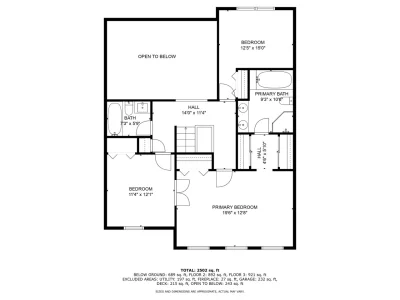
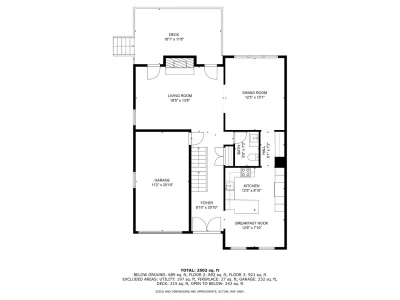
Every photo is classified as either a photo or a floor plan, and the two display in separate groups on the delivery so agents can find the layout at a glance. See delivery galleries for what the client sees.
Every photo on the order is delivered, but you can keep one off the property website: right-click it and choose Hide from property website, and its tile shows an Off website badge. The client still gets it in their gallery. For reordering, hiding, and picking the cover from the website editor instead, see choosing which photos appear on a property website.






Downloading files from the order
You can pull files back off the order yourself, too. Select photos on the Media tab and the selection bar adds a Download menu:
- Original files — on a cloud-backed order, the originals straight from your cloud folder, saved file by file. On other orders that hold your uploaded originals, it reads Originals (ZIP) instead.
- MLS size (ZIP) — the listing-ready size, zipped.
- Web size (ZIP) — the smaller web size, zipped.
While it runs, the button shows the progress — “Preparing ZIP…”, or “Downloading 2 of 3” for file-by-file saves — and Stop downloading ends a file-by-file run. On an iPhone or iPad, the menu steps through Download file 1 of 3 one tap at a time. For a single photo, right-click it for Download MLS photo, Download web size, or — on a cloud-synced photo — Download original from Dropbox (or Google Drive).



How Spatiko optimizes your files
Spatiko optimizes every uploaded file for delivery automatically — no manual exporting on your side, and nothing to configure. At download, the format choice is:
- Listing Ready — the high-resolution version optimized for listing portals and print, and the one most agents pick. “Listing Ready” is only a size and quality label; Spatiko does not connect or upload to any MLS or listing service.
- Web & Social — smaller files for email, social, and websites, so delivery galleries and property websites load fast on any connection.
- Full Quality — the largest files, available when the order has originals to serve: uploaded originals or a connected cloud delivery folder.
Web & Social and Listing Ready are always available to you on the order and to your client on the delivery, so the agent can grab the right file for the listing without asking you for a re-export. Full Quality appears when the order has originals to serve. On a cloud-backed order, a whole photo section downloads in one go, while a selection or the floor plans download as separate files — see delivery galleries for what the client sees.
Getting true full-resolution originals to your client
If you want your clients to download true full-resolution originals, connect cloud storage. On a cloud-backed order, Spatiko serves the originals straight from the order’s delivery folder in your Dropbox or Google Drive, and the client downloads them from inside the Spatiko gallery — they never touch, see, or need a Dropbox or Google Drive account. See cloud storage sync.
Processing and the hero image
Processing runs in the background. Each file moves from Pending to Processing to Ready, then appears in the gallery (a file that can’t be processed is marked Failed). You don’t have to wait around — keep working while Spatiko catches up.
The first photo to finish processing automatically becomes the hero image if you haven’t chosen one. The hero leads the gallery and the property website, so pick a favorite once your files are ready.
You can also turn on optional AI photo tagging, which labels rooms and generates alt text to speed up organizing and captioning. It’s a labeling aid — metered by credits, and it never changes the photo. To actually edit photos with AI — virtual twilight, staging, a new sky — open AI Studio from the Media tab toolbar once the photos are ready.
Once your photos are ready they also feed Marketing Studio, where you or the agent turn them into ready-to-post social images, stories, and print flyers.
The order can move to the next stage on its own
By default, an order sitting in Planning moves to Production automatically the moment the first media lands on it — a direct upload, a cloud import, a video, or an AI edit you keep. Sending the shoot out for editing does the same thing. The move only happens while the order is still in its first stage, so it never pulls an order back from somewhere later, and the change is written to the order’s activity log so the timeline stays honest.
On Pro and up you can pick which stage this moves the order to, or turn the automatic move off — see customizing your order pipeline. For how stages fit together, see the order lifecycle.
Re-exported an edit? Refresh from source
For a photo that came in through cloud sync, you don’t have to delete and re-import it when the edit changes. Re-export the corrected version over the same file in your cloud folder, then pick Refresh from Dropbox (or Refresh from Google Drive) on that photo — Spatiko pulls the new version and reprocesses it in place, keeping its position, tag, and hero status. More on this in cloud storage sync.
Go deeper
- Sending a delivery — publish the gallery and notify the client in one action.
- Cloud storage sync — connect Dropbox or Google Drive so finished files flow in on their own.
- Embedding 3D tours and video — add Matterport, Zillow, and hosted video as links instead of uploads.
- Editing photos with AI Studio — virtual twilight, staging, and other AI edits on the photos you just uploaded.
- AI credits — what AI photo tagging and AI editing cost, and how your credit balance works.
Frequently asked questions
Can I upload RAW or HEIC files to an order?
No — photo uploads take JPEG and PNG only, so export your finished edits before you upload. A file in the wrong format or over the size limit is rejected by name, so in a big batch you know exactly which one to fix.
How do I add a Matterport tour or a hosted video to an order?
Those aren't uploaded as files at all. Matterport and other 3D tours, Zillow tours, and externally hosted video are added to the order as links instead. Video files you hold yourself upload normally, alongside your photos.
How does Spatiko choose the hero image?
The first photo to finish processing automatically becomes the hero if you haven't chosen one yourself. The hero leads the gallery and the property website, so it's worth setting a favorite once your files are ready.
Does AI photo tagging edit my photos?
No. It's an optional labeling aid — it labels rooms and generates alt text to speed up organizing and captioning, and it's metered by credits. It never changes the photo itself. For AI edits such as virtual twilight, virtual staging, or sky replacement, use AI Studio — available on every plan and paid for in credits — where you review every result before it's added to the order.