Virtual Staging and Twilight Add-Ons: What to Charge (2026)
Virtual staging for real estate photographers: which edits to offer, how to price them per photo or in packages, the margin math, and disclosure rules.
Virtual staging for real estate photographers is an add-on that earns more without another minute on site, and so are virtual twilight and sky replacement. You shoot the listing once, make the edits from photos you already have, and deliver them with the rest of the shoot. Price them against what the agent would otherwise pay (a staging company, a human editor, a second trip at dusk), not against your own cost, which with AI editing can run to cents a photo. And treat disclosure as part of the product, because many listing services, and California law, require altered photos to be labeled.
It’s 9pm on a Tuesday and Jordan Meyers at Hartwell Realty texts you. The listing at 218 Glenwood Avenue goes live Thursday, the seller has seen a neighbor’s dusk photo, and could you go back for a twilight shot? A yes means a second drive timed to sunset on a day that’s already full. “I can add a virtual twilight to the front exterior by tomorrow morning, $35 a photo” costs you a few minutes at your desk.
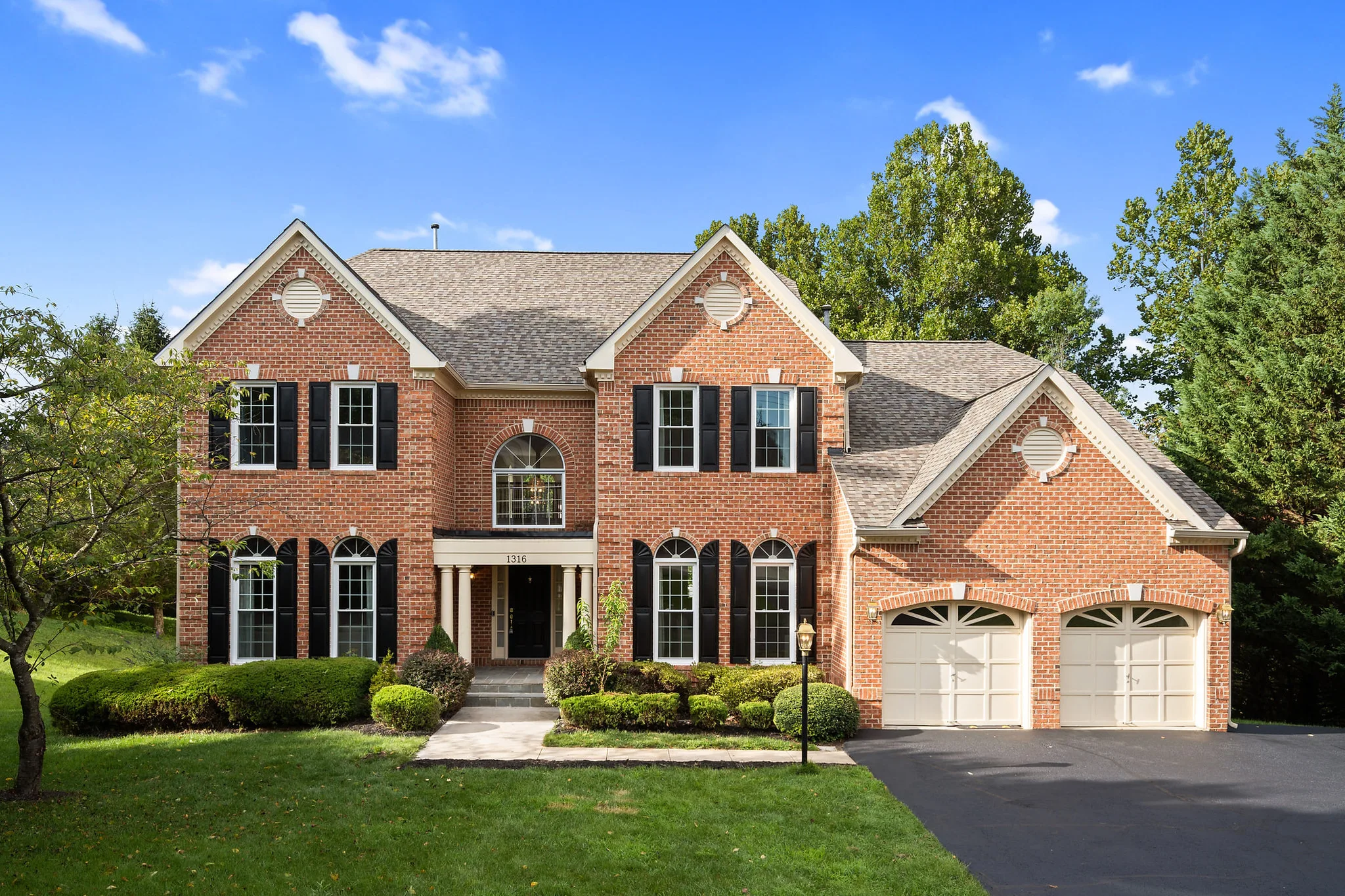
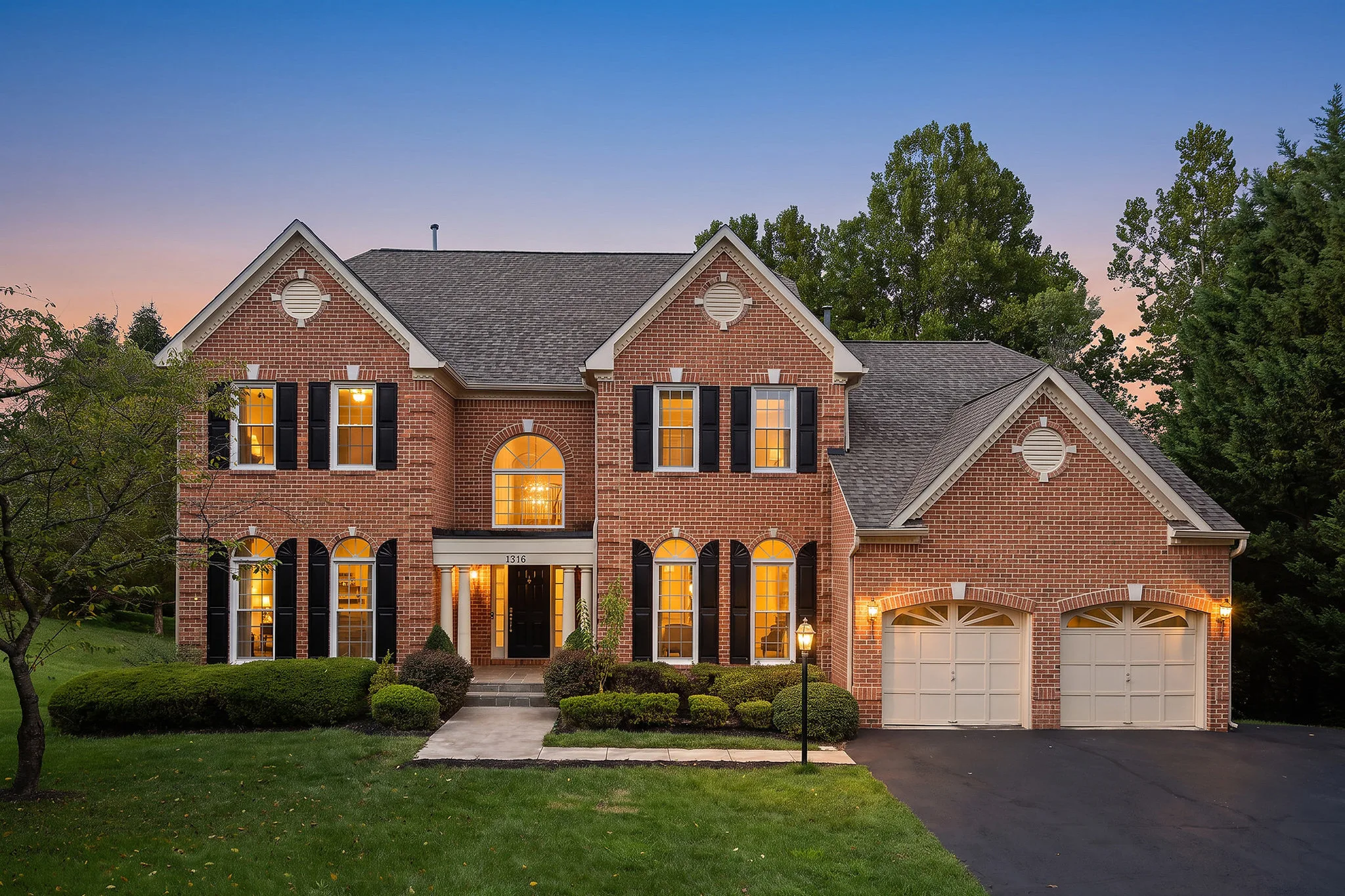
Which edits should you offer, and when?
Offer the edit that fixes a problem the listing has. Start with three, each with a clear trigger for suggesting it.
| What you see at the shoot | Edit to suggest | Why the agent cares |
|---|---|---|
| Empty living room, primary bedroom or dining room | Virtual staging | Buyers can judge scale and use, without the cost of physical staging |
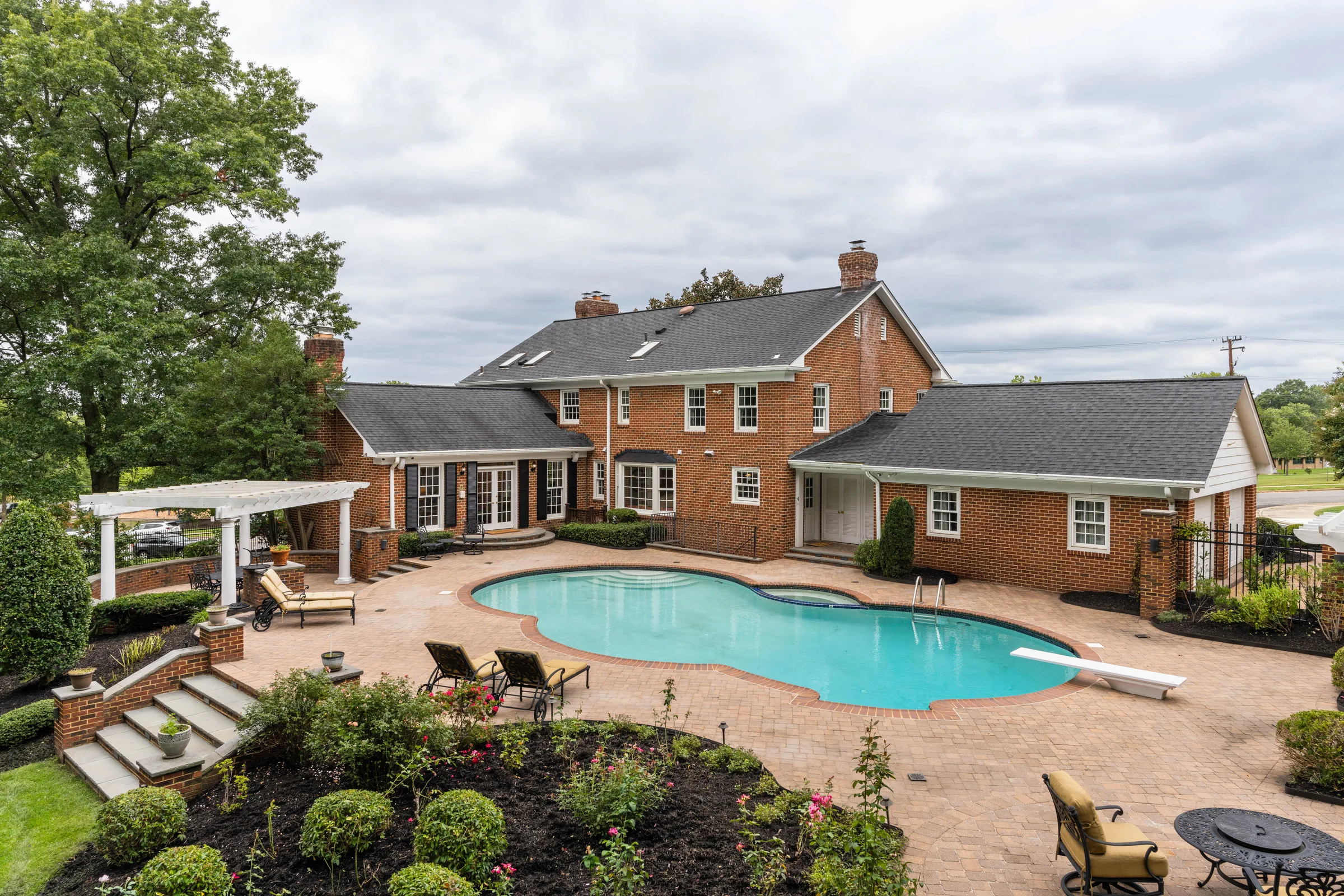
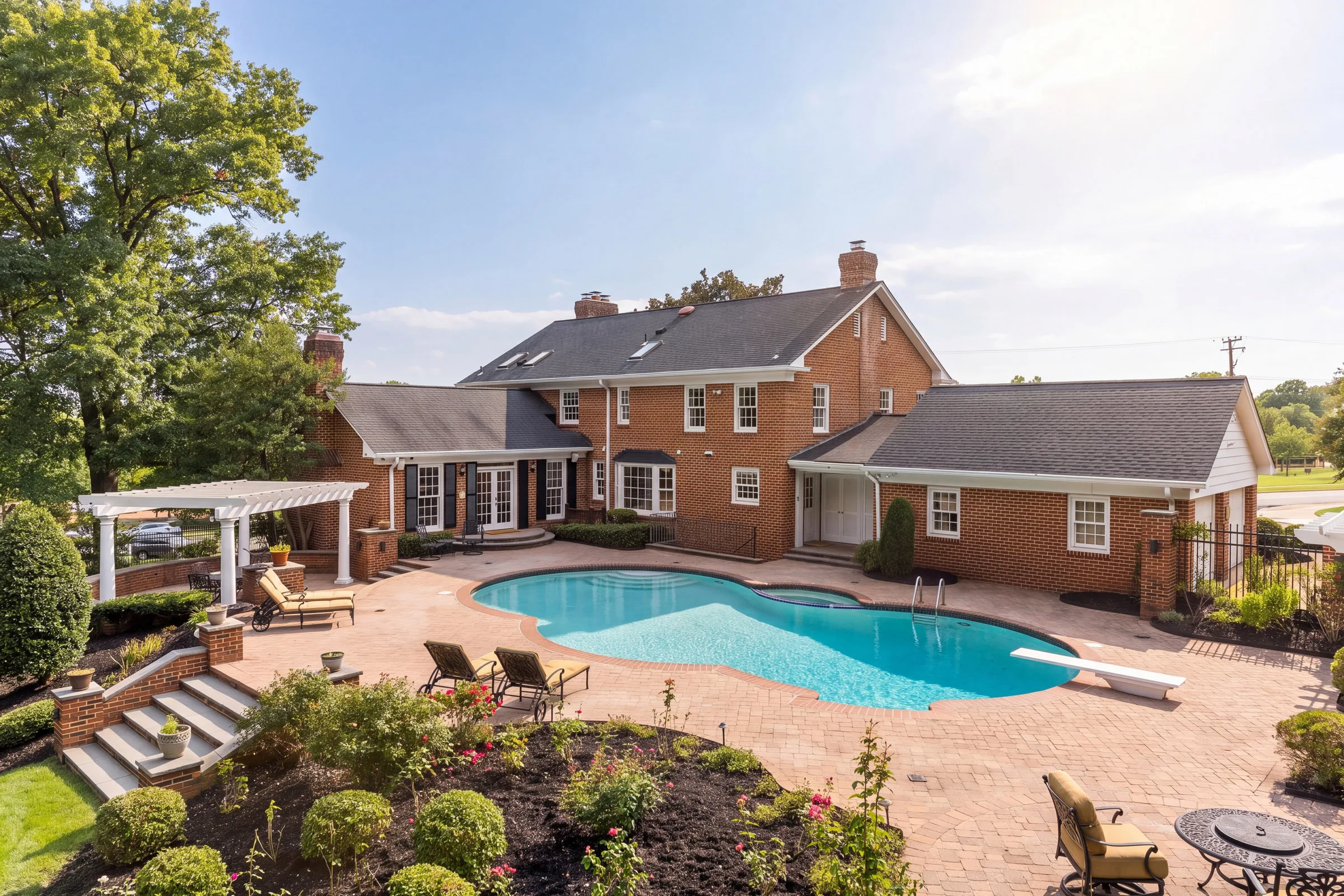
| Flat, gray or blown-out sky on exteriors | Sky replacement | The exterior is often the cover photo, so a dull sky costs the most there |
| A strong front elevation or a pool, on a listing that needs to stand out | Virtual twilight | A dusk shot reads as premium without a sunset appointment |
The staging pitch has research behind it. In NAR’s 2025 Profile of Home Staging, 83% of buyers’ agents said staging made it easier for a buyer to envision the property as their future home. In the same survey, 51% of sellers’ agents said they didn’t stage homes before listing them. Buyers’ agents see the value, and half of listing agents still skip it. Virtual staging is the cheap way to close that gap.
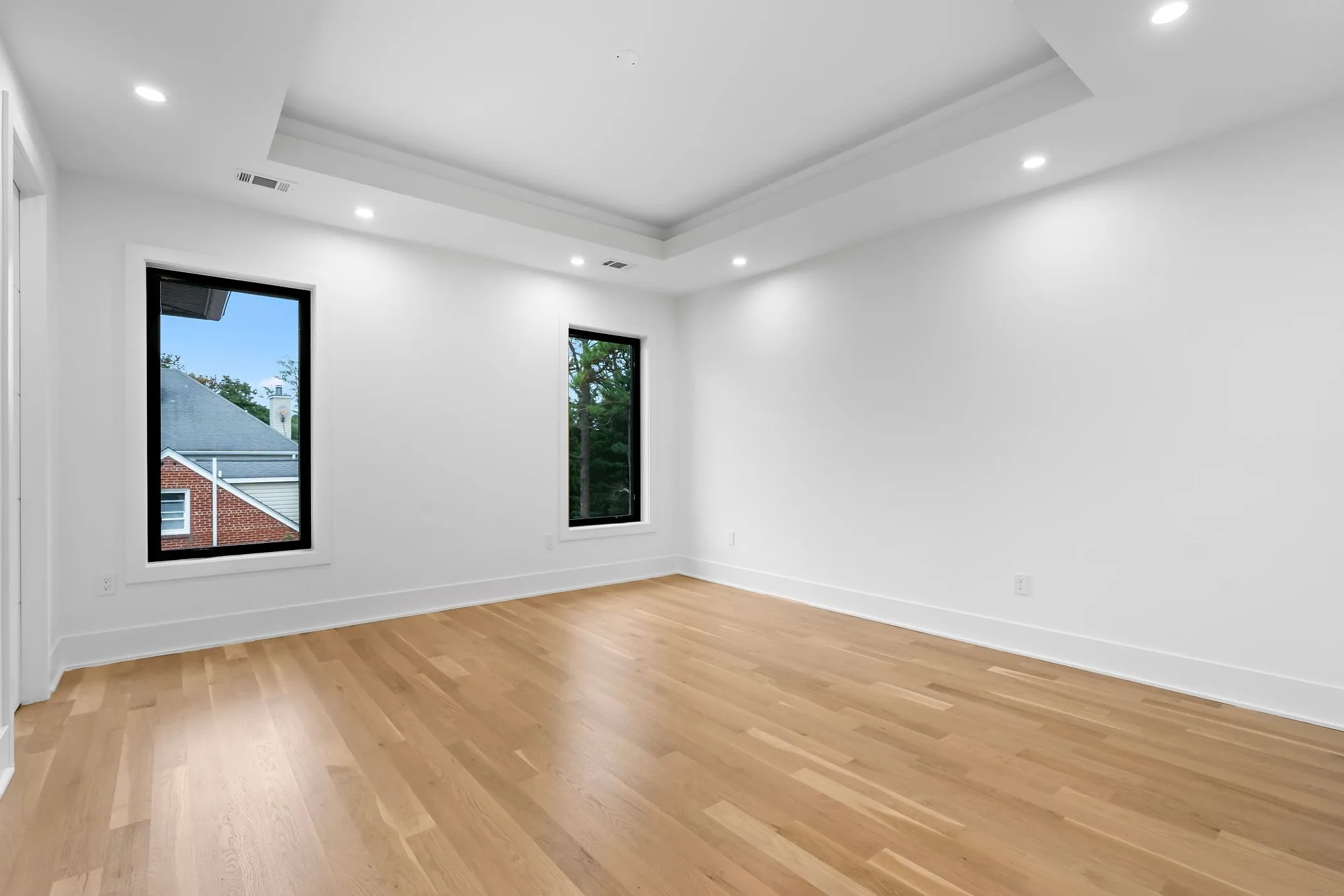
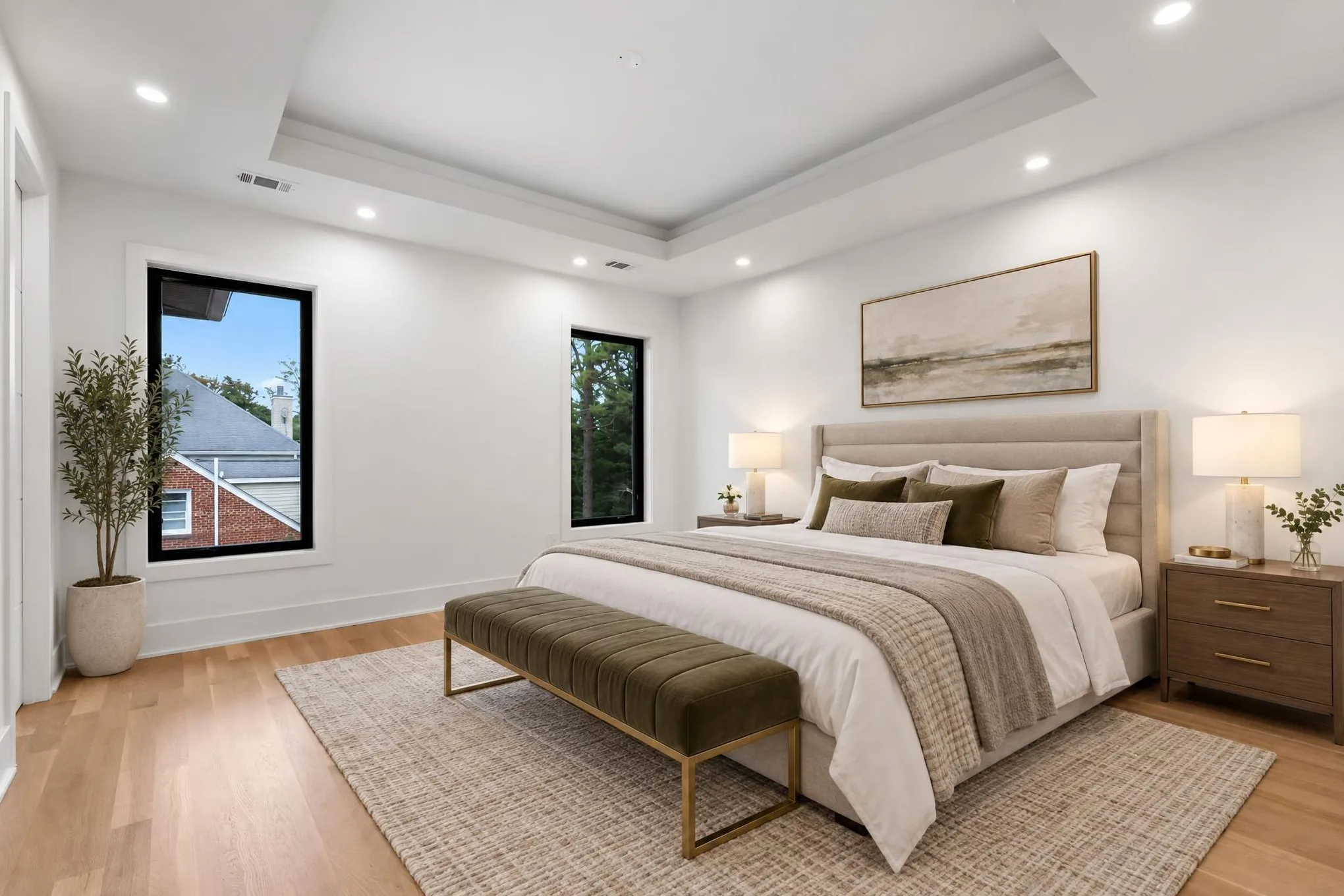
Be careful with edits that change the property itself: green lawns, removed fixtures, new floors, season swaps. That’s where listing rules bite hardest (more below), so keep them out of listing photos unless the agent’s MLS allows them with a label.
How much should you charge for virtual staging and virtual twilight?
Charge per photo, under what the agent would pay to have the work done elsewhere and well above your own cost. That leaves more room than you’d think:
| The agent’s alternative | What it costs them | Source |
|---|---|---|
| A staging company furnishing the home | Median $1,500, or $500 when the agent stages it themselves | NAR, May 2025 |
| A human-edited virtual staging service | About $20–$50 per image; full-service agencies $50–$100+ | Maverick Frame, Oct 2026 |
| A do-it-yourself AI staging app | About $3–$15 per image, plus their own time | Maverick Frame, Oct 2026 |
| A real twilight shoot | $100–$200 per listing in one 2026 pricing guide | Our pricing guide |
The virtual staging figures are one rendering studio’s published 2026 estimates, not survey data, so treat them as a rough map and ask a few of your agents what they pay today.
Your staging price belongs above the app, because the agent is paying not to do it: no uploads, no picking styles, no checking whether a lamp is growing out of a window frame, and the photos arrive with the shoot. Where it lands against the human-edited services and agencies depends on your market and on what you include, such as one style change at no charge. If you can’t say what the agent gets beyond the pixels, your price will drift down to the app’s.
Price virtual twilight off an on-site twilight session. The on-site version is a separate trip at a fixed time of day, which is why it carries a premium. A virtual version saves the agent the scheduling and you the drive, so it should cost noticeably less than a sunset visit. In the sample price sheet we use in our guides, on-site Twilight Photography is $180 and a Virtual Twilight Edit is $35 a photo. Those numbers are illustrative; the roughly five-to-one ratio is what carries over to your own price sheet.
Per photo, per listing, or built into a package?
Sell staging per photo, and use twilight to make your upper packages visibly better. The number of empty rooms varies by listing, so a per-photo price scales fairly. If you sell three-tier packages, a virtual twilight exterior in the middle or top tier gives that tier something to show without costing you a trip.
| Approach | Works best for | Watch out for |
|---|---|---|
| Per photo | Staging, and sky replacement on request | Agents ordering one staged room when the listing needs three. Suggest a count. |
| Per listing (“twilight set”) | Twilight on two or three exteriors | Define how many photos the set covers before someone asks for eight |
| Included in an upper package | Twilight, or skies on every exterior | It only anchors the tier if the package lists it by name |
Sky replacement needs one decision up front. If your standard edit already fixes skies, don’t start charging for it, because agents notice when something they used to get becomes a line item. If it doesn’t, offer the swap as a small per-photo add-on or fold it into your middle tier.
What’s the margin on a virtual add-on?
Your review time costs more than the renders do. Take one order, with every price illustrative.
Jordan books HDR photography for 218 Glenwood Avenue, a vacant 3,240 sq ft home, and adds virtual staging on three empty rooms and virtual twilight on two exteriors at $35 a photo:
| Line | Amount |
|---|---|
| HDR Photography (2,000–3,499 sq ft band) | $240 |
| Virtual staging, 3 photos × $35 | $105 |
| Virtual twilight, 2 photos × $35 | $70 |
| Order total | $415 |
| AI renders in AI Studio: 5 photos × 2 takes, paid in AI credits | a few dollars |
| Your time reviewing, re-running and picking takes | about 20 minutes |
The add-ons take the order from $240 to $415, about 73% more, with no extra drive.
Three costs hide outside that arithmetic. Takes you discard are still paid for. Some rooms need a second run or a different style. And agents will ask for changes (“can the sofa be gray?”). Set your revision policy before the first request. One style change included, then a new take at the per-photo price, is easy to explain.
How do you put an edit on your order form?
List each edit as its own add-on service, with a per-photo price and a quantity, so agents add it at booking the way they add drone. Name it by outcome (“Virtual twilight, per exterior photo”) and say in the description that it’s made from your photos and delivered next to the originals. A booking question such as “Is the property vacant?” gives you the cue to suggest staging before you arrive.
In Spatiko, an AI edit you sell is a normal service in your catalog. File it under Add-ons & upgrades and mark it virtual, so it adds no on-site time and never touches your calendar. Nothing links the service to AI Studio automatically: after the shoot, you open AI Studio on the order’s photos, make the edits and review every result. Kept edits join the order as new photos next to their originals and go out in the same delivery. AI Studio is on every plan, Free included, with each edited photo paid for in AI credits. The AI Studio guide covers the edits, output sizes and the review step.
How do you pitch virtual staging and twilight to agents?
Show agents their own listing, edited. A before/after from a house they’re selling does more than any price sheet.
- Do the first one on the house. Pick the strongest empty room or the best exterior on an agent’s next listing, edit it, and send it with the delivery, along with the price for next time. It costs you cents and a few minutes.
- Offer it when the need is obvious. At booking (the vacancy question), on site (“the living room’s empty, want it staged?”) and at delivery.
- Put the price in the offer. A specific number makes yes easy. “Let me know if you want staging” usually gets silence.
- Raise disclosure before they do. Rules on altered photos are tightening, and the photographer who brings them up first sounds like the safe choice.
A text you can adapt:
Hi Jordan, the living room, dining room and second bedroom at 218 Glenwood are empty. I can virtually stage them for $35 a photo and add a dusk version of the front exterior for the same price. You’d get them with the rest of the photos tomorrow, each next to its original so you can label them for the MLS. Want all four?
Do virtually staged photos have to be disclosed?
Often, yes. There’s no single national rule in the US or Canada: requirements come from the agent’s professional code, their MLS and, in some places, state or provincial law. The duty usually sits with the agent and their brokerage, but you produce the images, so make compliance easy. This is an overview, not legal advice, and rules change, so check the market each listing is in.
- NAR Code of Ethics. Article 12 requires REALTORS® to “present a true picture” in their advertising, and Standard of Practice 12-10 lists “use of misleading images” among the ways to break that duty (2026 Code, in effect since January 1, 2026).
- California. Since January 1, 2026, licensees must clearly disclose images digitally modified in a way that changes the property’s appearance, AI edits included, and make the original available to consumers (California DRE advisory, March 2026). CRMLS requires the unaltered original immediately before or after the altered image, and doesn’t permit AI-generated landscaping images in the MLS. CRMLS adds that minor adjustments such as brightness, color correction and lighting aren’t affected.
- Other MLSs. NorthstarMLS’s proposed guidelines (July 2026) would allow virtual staging only for personal property such as furniture and decor, ask for an unaltered “before” image of each edited room, and bar changes to permanent elements.
- Canada. According to Real Estate Magazine (March 2026), CREA doesn’t regulate AI use in listings and points to provincial regulators and local MLS rules. Calgary’s board, the same report notes, requires virtual staging to be disclosed in the listing’s public remarks.
None of the rules above names sky replacement or twilight, so follow CRMLS’s own advice and disclose when in doubt. Whatever tool you use, build four habits:
- Deliver every edited photo next to its original, never instead of it.
- Name or caption edits clearly (“virtually staged”, “digitally altered”) so the agent can label them in seconds.
- Stage furniture and decor only. Don’t add or remove anything permanent, and don’t fake landscaping.
- Ask which MLS or listing portal the photos are going to.
Add one edit at a time
Pick the add-on your listings need most often, put it on your order form at a price you can say in one breath, and add the next one once it sells. If you’d rather make the edits inside the order and deliver them with the shoot, AI photo editing in Spatiko shows every edit, real before/after examples and what each photo costs.
Frequently asked questions
Is virtual twilight as good as a real twilight shoot?
Not quite, and it's worth telling agents why. A real twilight session captures real interior light, real reflections and the actual evening sky, so it's still the better choice for a luxury listing or a home with standout exterior lighting. A virtual twilight is made from a daytime photo, costs the agent less and needs no second visit, which suits most other listings. Keep both on your menu and let the listing decide.
Can you virtually stage a room that still has furniture in it?
You can, but it's a bigger and less predictable edit, because the existing furniture has to come out before new pieces go in. Rules that allow virtual staging, such as NorthstarMLS's proposed guidelines, cover adding or removing personal property like furniture and decor, not changing the room itself. Keep walls, floors, windows and fixtures exactly as shot, and for an occupied home, tidying the real room before the shoot usually gives a better result.
What should you say if an agent asks you to edit out something permanent?
Say no, and explain that it's a condition of the property rather than something in the way. A power line, a stained ceiling or a damaged fence is part of what the buyer is getting, and some MLS rules, CRMLS's among them, bar editing elements of the property out of listing photos. A car in the driveway or bins at the curb aren't part of the property, but treat removing them as an alteration too: CRMLS counts even virtually clearing out furniture as one, so label the photo and deliver the original alongside. Check the agent's MLS if you're unsure.
Should you tell agents the edits are made with AI?
Yes. The agent carries the disclosure duty for their listing, and they can't label what they don't know about. Saying plainly that staging and twilight are AI edits you review by hand also sets the right expectations about what an edit can fix and what it can't, which saves you awkward revision requests later.
See it in action
Learn how Spatiko's AI Photo Editing feature can help your business.
Explore AI Photo Editing