Just Listed Graphics: An Add-On Agents Actually Use
Just listed social media posts, stories and flyers made from your photos: what goes in the set, whose branding goes on it, and whether to charge.
Just listed social media posts are the graphics an agent puts out the day a listing goes live: a feed post, a story, often a carousel, and a printed flyer for the open house. Every listing needs them, and they’re built from your photos. Hand them over finished, in the agent’s own branding, alongside the photos, and you remove a chore the agent repeats on every listing. You can treat that as a reason agents pick you or charge for it as an add-on, and both work as long as a set takes you minutes rather than an evening.
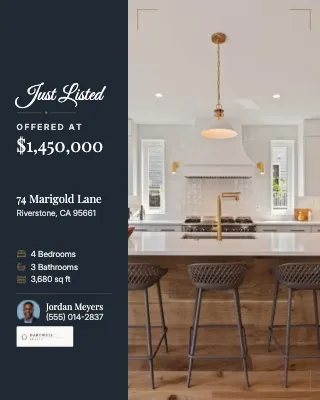
The Just Listed post for 74 Marigold Lane went up half a day after the listing did, with the square footage wrong. Jordan Meyers at Hartwell Realty had built it himself the night before, on his couch, dragging your kitchen shot into a template, retyping the price and hunting for a version of the brokerage logo that wasn’t blurry. None of that is your fault, but those are your photos, and they reached the public looking worse than when they left you.
What goes in a just listed social media package?
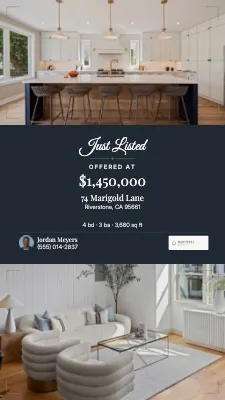
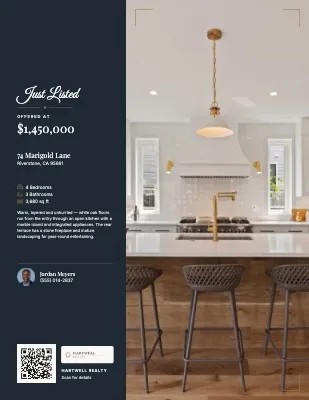
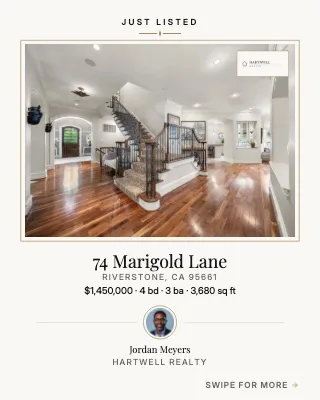
A complete set covers the four places a new listing gets announced: the feed, stories, a swipeable carousel, and paper. Each has its own shape, so one design cropped four ways looks wrong in most of them.
| Piece | Shape | What the agent does with it |
|---|---|---|
| Feed post | 4:5 portrait or 1:1 square | The announcement itself: hero photo, price, address |
| Story | 9:16 vertical | A full-screen version, reposted for the open house |
| Carousel | 4:5, several slides | A short room-by-room tour people swipe through |
| Flyer | US Letter or A4, one or two pages | Printed for the open house, the brochure box, the office |
Every piece repeats the same facts, so they should come from one place rather than being retyped four times, which is how a wrong square footage ends up on the story but not the flyer. Make the pieces match, too. A post, story and flyer from one template family look like one campaign, which is what an agent would get from a marketing team.
Why should photographers make listing graphics?
Because the agent is going to post the listing anyway, and you already hold every ingredient: the photos, the address, the specs, and usually the agent’s contact details from the booking.
Agents lean hard on social media. In NAR’s 2025 REALTORS® Technology Survey of more than 1,200 US members (published September 2025), 75% said they use social media, second only to e-signatures, and 39% named it as the tool that brings them the most quality leads, ahead of CRM software at 23%. And among agents who use AI, NAR’s September 2026 write-up of its 2026 Technology Report ranks social media posting second only to listing descriptions as the job they use it for. Agents are already looking for faster ways to make posts.
Today, plenty of agents build them themselves, often from a template in Canva or a similar design app. Search “just listed templates” and you’ll find pages of template packs sold to agents. Either way, someone retypes facts you already have and re-crops photos you already chose.
What you get out of doing it for them is the agent’s next booking. When your photos arrive with the posts already made, the agent has a reason to call you for the next listing that has nothing to do with price, and the seller sees their home announced with your photos cropped the way you would crop them.
Put the agent’s brand on it, not yours
Listing graphics are the agent’s advertising, so they carry the agent’s name, headshot and contact details and the brokerage’s logo and colors, with nothing of yours. A photographer’s logo on an agent’s Just Listed post competes with the agent’s own brand, which makes it a post they’d rather not use.
Your credit lives elsewhere: on the delivery page the agent downloads from, in the tag when they post, in the referral when a colleague asks who shot it. If you want the agent to tag you, ask once, at delivery.
Two things to settle before the first set:
- What the brokerage needs on its ads. Ask the agent which logo version, colors and details (a license number, say) have to appear, and keep the answer on file so you never have to work it out again.
- A plain version for the MLS. MLS branding rules are written for what goes into the MLS. California’s CRMLS counts logos, contact information and team names in MLS photos as branding, which its rules don’t allow (CRMLS broker report, October 2024), while Arizona’s ARMLS says in a 2020 rules explainer that its contact-information rules don’t apply to flyers or social posts. So the branded set is for social and print, and anything that might end up on the MLS or a listing portal needs an unbranded copy. Rules vary, so check the agent’s MLS.
In Spatiko, listing designs never carry your studio’s name or logo. A new design starts from the brokerage’s brand kit, with any colors you’ve set for that one agent layered on top. Client and company brand kits explains how to set them up once per brokerage.
A listing needs more than the first post
The Just Listed post is only the first. A listing can move through coming soon, open house, a price change, under contract and sold, and each stage is another post the agent wants out quickly.
If your templates can switch the badge and wording per stage, you can send the open house story the week of the open house, or the Just Sold post the day the agent tells you it closed. Each is another reason for the agent to think of you, and each costs you a few minutes. Two small rules make these read right: under contract and sold posts drop the asking price, and they lose any “book a showing” line.
Should you include listing graphics or charge for them?
Either works. Include them if you want graphics to be the reason agents book you; charge for them if you want them to earn on their own.
| Option | Choose it when | Risk |
|---|---|---|
| Include in every package | You want it to be why agents choose you, and a set takes you minutes | Agents stop noticing what’s always free, so build the time into your package prices |
| Include in top packages only | You use packages to steer agents toward a bigger order | The top tier still has to be worth it without the graphics |
| Paid add-on per listing | Many of your agents have their own designer or brokerage templates | It only sells if it’s offered at booking, not in a follow-up email |
| Free on a new agent’s first listing | You’re trying to win the agent | Say clearly what it costs from the second listing on |
An illustrative run of the numbers (made up for the arithmetic, not market rates): your packages are Essentials at $249, Pro Marketing at $429 and Luxury Premier at $849. You put the full listing set into Pro Marketing and Luxury Premier, and offer it to Essentials bookers as a $45 add-on at checkout.
- If 6 of a month’s 20 Essentials bookings take the add-on, that’s $270. At 15 minutes a set, it’s 90 minutes of work.
- If the graphics also move two agents a month from Essentials up to Pro Marketing, that’s $360 more in bookings. The extra services in that package cost you field time, so the margin is smaller than the headline.
Run it with your own numbers. For what the services themselves sell for, see what to charge for real estate photography, including why add-ons belong in the booking flow.
When agents won’t use what you make
Some agents won’t use your set, and it’s worth knowing which ones before you build a package around it.
- Agents whose brokerage mandates its own templates. Rebuild the brokerage’s layout once as a reusable template, then fill it with each listing’s photos. You become the photographer who already knows the brand rules.
- Agents with a designer or a strong personal brand. Offer the photos in the right sizes and stay out of the design. They’re unlikely to buy graphics from you, and that’s fine.
- Agents who barely post. The printed flyer still earns its place at the open house, even if the social pieces don’t get posted.
- Agents who mostly want video. A reel is a separate deliverable with its own time cost. Graphics complement video; they don’t replace it.
Making the set from a Spatiko delivery
In Spatiko, listing graphics come from Marketing Studio, which is on paid plans (see pricing). On the order, you pick a template set and create every format at once. The photos, address, listing details, agent and brokerage fill in from the order, and the finished set goes onto the delivery page below the photos. You can also save a design as your own template and offer it on one brokerage’s orders, which covers the mandated-template agents above.
Agents can make their own designs from the same delivery page or their client portal, even if you never add a set. They download images, print-ready or home-printer PDFs, and unbranded copies, then post from their usual apps, since there’s no direct posting to social networks. The section appears once the order is delivered, and if downloads wait on payment, once it’s paid. The Marketing Studio guide walks through it, and the Marketing Studio overview shows where it sits in delivery.
Frequently asked questions
What should a just listed flyer include?
A strong hero photo, the price, the full address, beds, baths and square footage, a short description of two or three sentences, and the agent's name, headshot and phone number with the brokerage logo. A QR code that opens the listing's property website earns its space, because people pick flyers up at an open house and look at them later. Use a second page for more photos or a floor plan rather than more text.
When should listing graphics be ready?
With the photos, or as close to it as you can manage. Agents announce a listing when it goes live, so a set that arrives two days later competes with whatever the agent already put together in the meantime. If you can't make them the same day, tell the agent when they'll land so they can plan the announcement around it.
How many slides should a just listed carousel have?
Enough to walk through the home once without repeating a room: the hero exterior, the main living space, the kitchen, the primary bedroom, a bathroom, any standout feature, and a closing slide with the agent's contact details. Put the strongest photo, the price and the address on the first slide, because that's the one that shows in the feed and decides whether anyone swipes.
Should agents be able to change the listing graphics you deliver?
They should be able to, because agents rewrite headlines, swap the hero photo or add an open house time. What needs protecting is the facts, since a retyped price or square footage spreads to every copy. In Spatiko, agents can edit the designs you deliver or make their own, while the listing details stay read-only for them and come from the order you filled in.
See it in action
Learn how Spatiko's Media Delivery feature can help your business.
Explore Media Delivery